
Nov 16, 2010
0
Nov 16, 2010


read more
How to Add Social Bookmark to Your Blog
Social bookmarking is now a very important when it comes to your blog SEO, because it can provide you back links. I think you want to make it easy to your visitors to share and bookmark your blog posts. To do this please click here to go to add this site:
Then you will see the page as below

Then click on Add This button to get the code; after you click on Add This button it will appear the other dialogue as below:

Select you style: select social bookmark style that you want to add on your blog;
then click on Get Your Button, and copy code and go to your blog dashboard and click on Edit HTML then past it after the tag <data:post.body/>
Nov 11, 2010
0
Nov 11, 2010

 Fill out Twitter account: Type your Twitter account user name
Label: Choose your Twitter badge label that you like.
Color: Select your badge color that you like
Side: where do you want to display your twitter badge
From top: the space between top and badge in pixels.
Then Click on Update Code to generate Twitter code then copy twitter code and past it into HTML/Java Script and click on Save button.
That's it.
read more
How to add STATIC FOLLOW ME Twitter on your blogger

Recently, Twitter were getting more and more popular for blogger or wordpress. It could help your blog more popular and the reader also want to know about your latest news or information that you had updated in your popular blog.
In order to add STATIC FOLLOW ME Twitter on your blog, you need to go to go2web20.net page for generat Twitter code.
Click here to go to Go2web20.net page
After you access to Twitter page you will see a small form as below:

Label: Choose your Twitter badge label that you like.
Color: Select your badge color that you like
Side: where do you want to display your twitter badge
From top: the space between top and badge in pixels.
Then Click on Update Code to generate Twitter code then copy twitter code and past it into HTML/Java Script and click on Save button.
That's it.
Nov 8, 2010
0
Nov 8, 2010
 read more
Display Related Posts Within Your Blogger
The most important thing for blogger is to make their visitors keep return to their blog and spend more time with their blog. In order to achieve this you may need linkwithin site to generate code for adding in your blog widget.
linkwithin will help you to display relate topic with thumbnails at the posts footer, such as: Relevance post and popular post.
In order to do this, you need to follow some steps as below:
Step 1: Go to linkwithin.org and fill the form at the right side then click Get Widget button (see below snap shot)
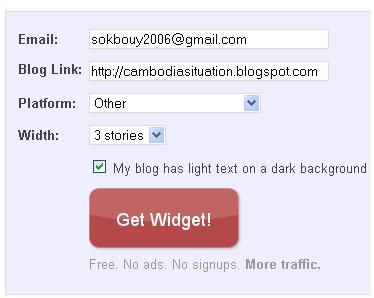
After you click Get Widget! button, you will see the Install Widget Platforms contained the code as below:
var linkwithin_site_id = 37674;
Step 2: After you copied code number, please login to your blogger then go to Layout and click on Edit HTML in your bloger dashboard and check the word Expand widget templates box and use your browsers finder by press “Ctrl+F” and find the tag <div class='post-footer'>

Subscribe to:
Posts (Atom)
